Samstag, 11. Oktober 2014
05_Python_&_LED (erledigt)
http://rasppiprojekte.blogger.de/stories/2442344/
0. Bild
-
1. Projektstatus
- erledigt
2. Teilprojekte
- 03
3. Hardware
4. Pin-Belegung
- Pin 1; 3,3 Volt (+)
- Pin 11; GPIO 17 (-)
5. Code
gpio export 17 out
gpio -g write 17 0 --> licht an
gpio -g write 17 1 --> licht aus
//umschalten in den Lesemodusm
gpio export 17 in
gpio -g read 17 --> gleich 1 licht aus, gleich 0 licht an
05_quellcode (txt, 0 KB)
python-Script
/Documents/nano 05.py
sudo python 05.py
6. Anmerkung
.
0. Bild
-
1. Projektstatus
- erledigt
2. Teilprojekte
- 03
3. Hardware
4. Pin-Belegung
- Pin 1; 3,3 Volt (+)
- Pin 11; GPIO 17 (-)
5. Code
gpio export 17 out
gpio -g write 17 0 --> licht an
gpio -g write 17 1 --> licht aus
//umschalten in den Lesemodusm
gpio export 17 in
gpio -g read 17 --> gleich 1 licht aus, gleich 0 licht an
05_quellcode (txt, 0 KB)
python-Script
/Documents/nano 05.py
sudo python 05.py
6. Anmerkung
.
thomasschwerin am 11. Oktober 14
|
Permalink
|
0 Kommentare
|
kommentieren
Freitag, 10. Oktober 2014
04_Python
http://rasppiprojekte.blogger.de/stories/2442344/
Kurs
http://mschimmels.de/files/Python-Kurs.pdf
IDE
Eric für Debian
# Zeilenkommentar
''' Mehrzeilenkommentar '''
Funktion
def quadrate(zahl):
return zahl * zahl
Funktion - Aufruf
quadrate(3)
Wörter
and
as
assert
break
class
continue
def
del
elif
else
except
exec
finally
for
from
global
if
import
in
is
lambda
not
or
pass
print
raise
return
try
while
with
yield
Arithmetische Operationen
+
-
*
/
% - Modulus
** Exponentiation
Besonderheiten
zahl1 = 456,78 (Leerzeichen)
text1 = 'Das ist ein Text'
== gleicher Wert
is gleiches Objekt
.
Kurs
http://mschimmels.de/files/Python-Kurs.pdf
IDE
Eric für Debian
# Zeilenkommentar
''' Mehrzeilenkommentar '''
Funktion
def quadrate(zahl):
return zahl * zahl
Funktion - Aufruf
quadrate(3)
Wörter
and
as
assert
break
class
continue
def
del
elif
else
except
exec
finally
for
from
global
if
import
in
is
lambda
not
or
pass
raise
return
try
while
with
yield
Arithmetische Operationen
+
-
*
/
% - Modulus
** Exponentiation
Besonderheiten
zahl1 = 456,78 (Leerzeichen)
text1 = 'Das ist ein Text'
== gleicher Wert
is gleiches Objekt
.
thomasschwerin am 10. Oktober 14
|
Permalink
|
0 Kommentare
|
kommentieren
Freitag, 26. September 2014
00_Wissenswert
http://rasppiprojekte.blogger.de/stories/2442344/
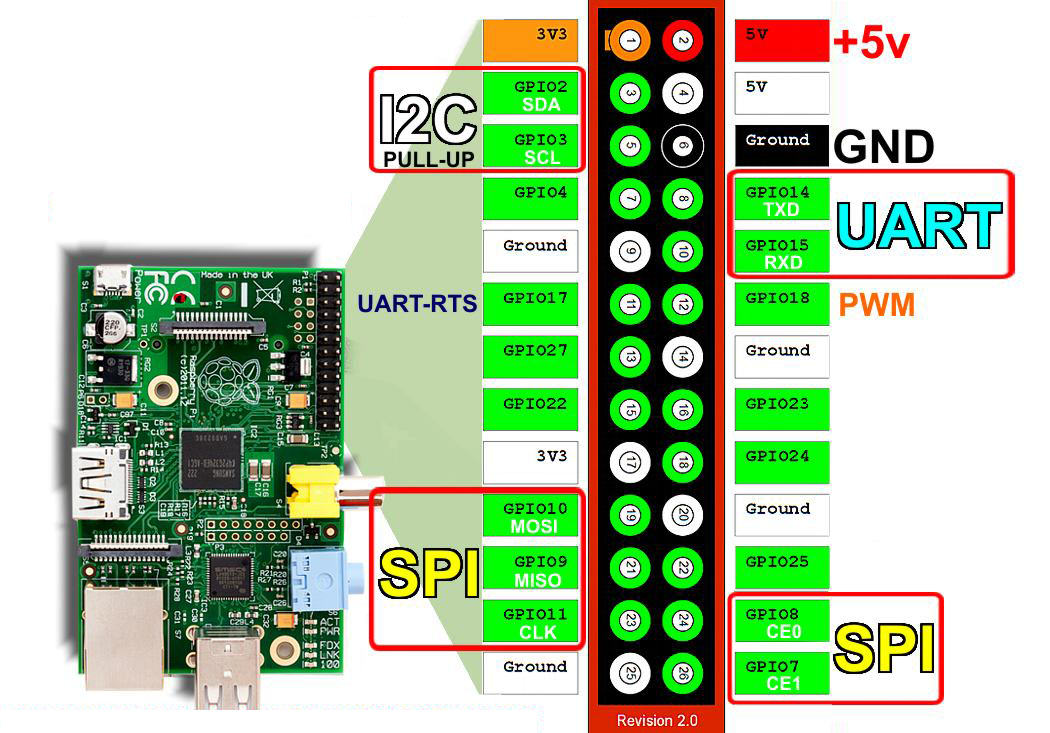
GPIO-Belegung hier
http://developer-blog.net/wp-content/uploads/2013/09/raspberry-pi-rev2-gpio-pinout.jpg
Anleitung für Servo und Bestelleung hier:
http://kampis-elektroecke.de/?page_id=3066
Bei Servo-Auswahl beachten:
http://www.flyheli.de/rxversorgung.htm
"Toward Pro" MG946R
http://www.robotshop.com/eu/en/hitec-hs422-servo-motor.html
HS-422 Servo
Beschleunigungssensor
http://www.youtube.com/watch?v=Pk0Pk8NPS1g
- elektronischer Strom fließt von + zu -
- GND (0 Volt) = Masse = Minuspol (-) (Basis des Massepotentials)
- hier immer Gleichstrom
- LED: lange Seite zeigt Richtung +
.
GPIO-Belegung hier
http://developer-blog.net/wp-content/uploads/2013/09/raspberry-pi-rev2-gpio-pinout.jpg
Anleitung für Servo und Bestelleung hier:
http://kampis-elektroecke.de/?page_id=3066
Bei Servo-Auswahl beachten:
http://www.flyheli.de/rxversorgung.htm
"Toward Pro" MG946R
http://www.robotshop.com/eu/en/hitec-hs422-servo-motor.html
HS-422 Servo
Beschleunigungssensor
http://www.youtube.com/watch?v=Pk0Pk8NPS1g
- elektronischer Strom fließt von + zu -
- GND (0 Volt) = Masse = Minuspol (-) (Basis des Massepotentials)
- hier immer Gleichstrom
- LED: lange Seite zeigt Richtung +
.
thomasschwerin am 26. September 14
|
Permalink
|
0 Kommentare
|
kommentieren
03_Projekt_LED_leuchten (erledigt)
http://rasppiprojekte.blogger.de/stories/2442344/
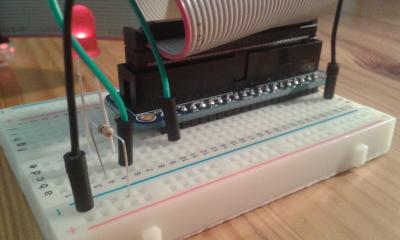
0. Bild
fertige Lösung
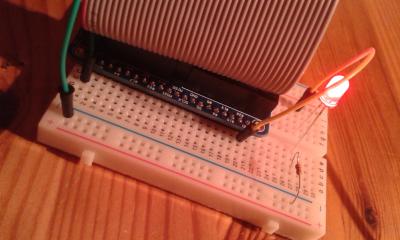
geht auch (verwirrt aber):
1. Projektstatus
fertig
2. Teilprojekte
keine
3. Hardware
- 1 x Cobbler
- 2 x Jumper
- 1 x LED
- 1 x Widerstand (330 Ohm)
4. Pin-Belegung
- Pin 1 (+)
- GND (-)
5. Code
- ohne
6. Anmerkung
- 5 LED's geschrottet
.
0. Bild
fertige Lösung
geht auch (verwirrt aber):
1. Projektstatus
fertig
2. Teilprojekte
keine
3. Hardware
- 1 x Cobbler
- 2 x Jumper
- 1 x LED
- 1 x Widerstand (330 Ohm)
4. Pin-Belegung
- Pin 1 (+)
- GND (-)
5. Code
- ohne
6. Anmerkung
- 5 LED's geschrottet
.
thomasschwerin am 26. September 14
|
Permalink
|
0 Kommentare
|
kommentieren
02_Installierte_Software
http://rasppiprojekte.blogger.de/stories/2442344/
((Noobs-Bundle))
SW löschen
- sudo apt-get purge evince
SW Liste aktualisieren
- sudo apt-get update
SW aktualisieren
- sudo apt-get upgrade
alte SW entfernen
- sudo apt-get autoclean
- sudo apt-get autoremove
Installierte Software
- sudo apt-get install pistore
- sudo apt-get install xpdf
- sudo apt-get install evince
Firmware update (uname -a)
- sudo apt-get install ca-certificates
- sudo wglt ...
- sudo chmod +x /usr/bin/rpi-update
sudo raspi -config
- expand_rootfs
- configure_Keyboard (105 Key)
- SSH
--- gpio installieren ----
sudo apt-get install git-core
git clone git://git.drogon.net/wiringPi
cd wiringPi
git pull orign
cd wiringPi
evtl. cd ..
./build
--- python installieren ---
sudo apt-get update
sudo apt-get install python-dev
sudo apt-get install python-rpi.gpio
--- mysql installieren ---
1 $ sudo apt-get install mysql-server
2 $ apt-cache search MySQLdb
3 $ sudo apt-get install python-mysqldb
4 $ mysql -u root -p /db: mysql /user:root
5 mysql> SHOW DATABASES;
6 mysql> CREATE DATABASE headborg
7 mysql> CREATE USER 'pi'@'localhost' IDENTIFIED BY 'wurst';
8 mysql> use headborg
9 mysql> GRANT ALL ON headborg.* TO 'pi'@'localhost';
10 mysql> quit;
--- Samba - Verzeichnisfreigabe installieren ---
sudo apt-get update
sudo apt-get upgrade
sudo apt-get install samba samba-common-bin
--- Maestro Servo Controller 18 Treiberinstallation
Download Software von
http://www.pololu.com/docs/0J40/3.b
autorconf --verbose
sudo apt-get install libtoolize
((Noobs-Bundle))
SW löschen
- sudo apt-get purge evince
SW Liste aktualisieren
- sudo apt-get update
SW aktualisieren
- sudo apt-get upgrade
alte SW entfernen
- sudo apt-get autoclean
- sudo apt-get autoremove
Installierte Software
- sudo apt-get install pistore
- sudo apt-get install xpdf
- sudo apt-get install evince
Firmware update (uname -a)
- sudo apt-get install ca-certificates
- sudo wglt ...
- sudo chmod +x /usr/bin/rpi-update
sudo raspi -config
- expand_rootfs
- configure_Keyboard (105 Key)
- SSH
--- gpio installieren ----
sudo apt-get install git-core
git clone git://git.drogon.net/wiringPi
cd wiringPi
git pull orign
cd wiringPi
evtl. cd ..
./build
--- python installieren ---
sudo apt-get update
sudo apt-get install python-dev
sudo apt-get install python-rpi.gpio
--- mysql installieren ---
1 $ sudo apt-get install mysql-server
2 $ apt-cache search MySQLdb
3 $ sudo apt-get install python-mysqldb
4 $ mysql -u root -p /db: mysql /user:root
5 mysql> SHOW DATABASES;
6 mysql> CREATE DATABASE headborg
7 mysql> CREATE USER 'pi'@'localhost' IDENTIFIED BY 'wurst';
8 mysql> use headborg
9 mysql> GRANT ALL ON headborg.* TO 'pi'@'localhost';
10 mysql> quit;
--- Samba - Verzeichnisfreigabe installieren ---
sudo apt-get update
sudo apt-get upgrade
sudo apt-get install samba samba-common-bin
--- Maestro Servo Controller 18 Treiberinstallation
Download Software von
http://www.pololu.com/docs/0J40/3.b
autorconf --verbose
sudo apt-get install libtoolize
thomasschwerin am 26. September 14
|
Permalink
|
0 Kommentare
|
kommentieren
01_Grundlegende_Befehle
http://rasppiprojekte.blogger.de/stories/2442344/
ls
ls - l (lang)
pwd (print working directory)
cd Desktop
cd ..
nano hello.txt
sudo adduser meinName
ps (Prozesse)
ps -f (Info's)
ps -ef (alle)
find / -name '*.txt'
kill-Kill 4711
sudo shutdown -h now
sudo rebott
man ls
wget webget http https ftp
tar Packprog
touch Name --> Datei anlegen
rm Name --> Datei löschen
cp altname neuname --> Datei kopieren
mv altname neuname --> Datei verschieben
mkdir verzeichnis --> Verzeichnis anlegen
rmdir verzeichnis --> Verzeichnis löschen
chmod xxxx name --> Rechte setzen
startx desktop starten
.
ls
ls - l (lang)
pwd (print working directory)
cd Desktop
cd ..
nano hello.txt
sudo adduser meinName
ps (Prozesse)
ps -f (Info's)
ps -ef (alle)
find / -name '*.txt'
kill-Kill 4711
sudo shutdown -h now
sudo rebott
man ls
wget webget http https ftp
tar Packprog
touch Name --> Datei anlegen
rm Name --> Datei löschen
cp altname neuname --> Datei kopieren
mv altname neuname --> Datei verschieben
mkdir verzeichnis --> Verzeichnis anlegen
rmdir verzeichnis --> Verzeichnis löschen
chmod xxxx name --> Rechte setzen
startx desktop starten
.
thomasschwerin am 26. September 14
|
Permalink
|
0 Kommentare
|
kommentieren
Suche
Neu
- 17_Python_Hexapode_Bewegu
ngen (thomasschwerin, 25.Jan.15) - 16_Hexapode_mit_3_Servos (erledigt) (thomasschwerin, 25.Jan.15)
- -1_Kosten (thomasschwerin, 25.Jan.15)
- 99_Startseite (thomasschwerin, 25.Jan.15)
- 15_Maestro_Servo_Controll
er (erledigt) (thomasschwerin, 24.Jan.15)
Links
Navigation
Meta
Archiv
- Mai 2026MoDiMiDoFrSaSo12345678910111213141516171819202122232425262728293031
RSS